On this page
Script automation (Lua)
A script is a short Lua 5.4 program that sends, waits, checks and loops on one connection. It picks up where the other two automation tools stop:
- a sequence sends, waits and checks replies without any programming, but it cannot keep a variable, branch on what came back or do arithmetic;
- an auto reply rule answers a request, but always with the same fixed bytes.
Reach for a script when the flow needs a variable, a condition, a loop, a calculation, or a binary reply taken apart: retry a command until the module registers, read a counter and compare it with the last one, build a frame from a table of values, or play a device whose answer depends on the request.
A script is written as plain sequential code — sendLine("AT"), then expect("OK"), then sleep(500) — and the application stays responsive while it waits. Even an endless loop can be stopped.
Tools → Scripts… opens the script window. It is a window of its own, so it can sit beside the main window while a script runs.
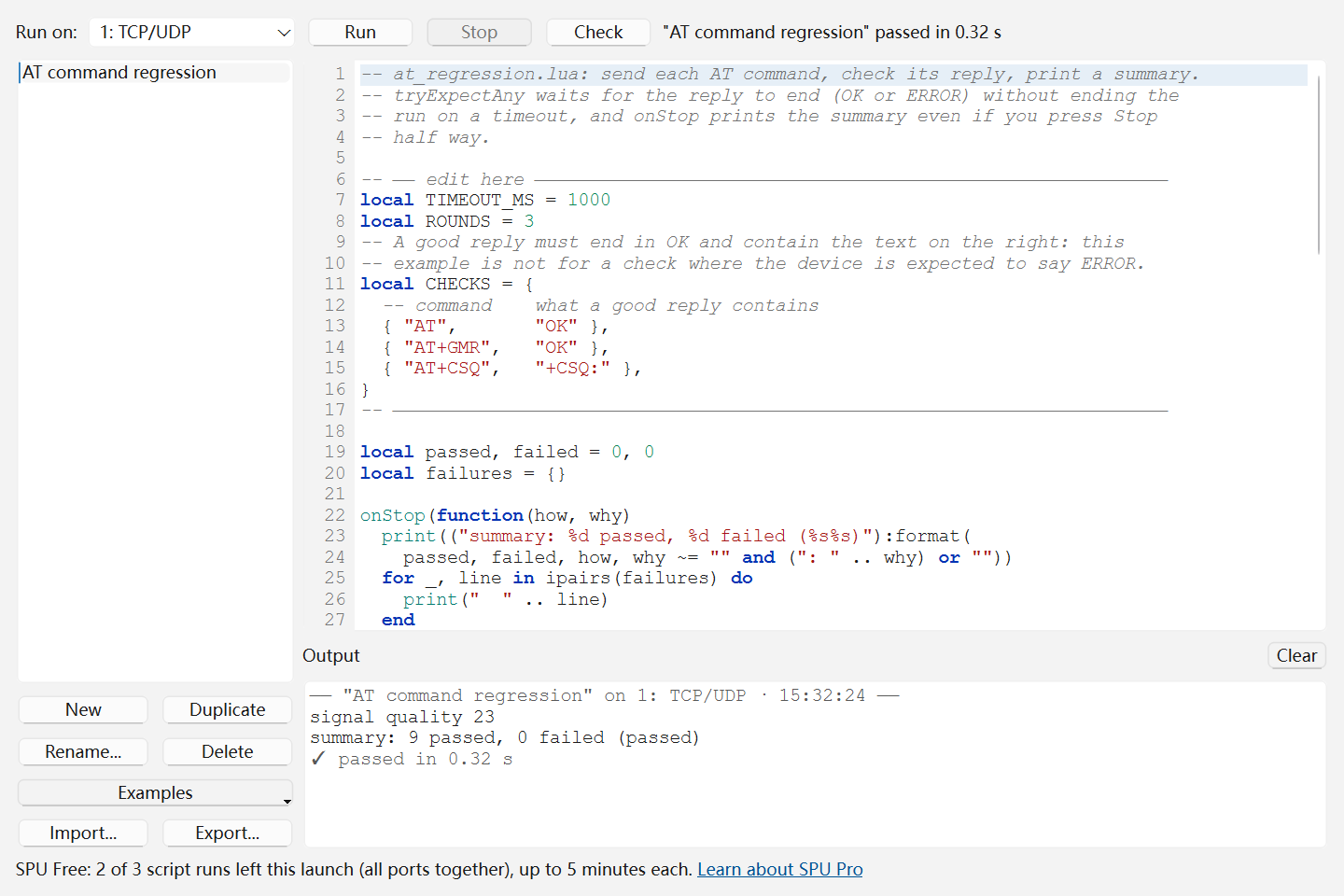
The script window
- Run on picks the connection the script sends to and reads from. Until you pick one by hand, it follows the connection that has the focus in the main window.
- Run (
Ctrl+R) starts the selected script on that connection; Stop ends it; Check looks for syntax errors without running anything or sending a byte. - The list on the left is the script library: New, Duplicate, Rename… (or double-click a script), Delete, Examples, Import… and Export…. A new script starts as a short AT check you can run at once.
- The editor has line numbers, syntax colouring for Lua and for the SPU functions, and marks the line the last check or run failed on. Tab inserts four spaces. Edits go into the library as you type; there is no Save button.
- Output shows what the script prints, any error, and the verdict of each run. Right-click it to Copy All, Save As… a text file, or Clear. It keeps the latest 5,000 lines.
- The line beside the buttons says what the run is doing right now — for example
Running "Modem check" 00:12 · expect "OK" (1000 ms).
Examples adds one of three working scripts to the library; the first two keep their settings in an "edit here" block at the top:
| Example | What it shows |
|---|---|
| AT command regression | Sends a list of AT commands for several rounds, checks each reply, and prints a summary — even when stopped half way |
| Modbus RTU slave | Answers FC03 reads and FC06 writes from a register table, with the CRC checked and appended |
| Answer PING with PONG | The shortest onReceive: a device that answers |
A first script
-- Ask the module for its signal quality, up to five times.
for attempt = 1, 5 do
  sendLine("AT+CSQ")
  local match, rssi = tryExpectRegex([[\+CSQ:\s*(\d+),]], 1000)
  if rssi and tonumber(rssi) ~= 99 then
    print("signal quality " .. rssi .. " after " .. attempt .. " attempt(s)")
    return
  end
  sleep(2000)
end
fail("the module never reported a signal")
A run ends in one of three ways, and both the Output and the connection's receive view say which:
- passed — the script ran to its end (or returned);
- failed — an
expecttimed out,fail()was called, a send was refused, or the code raised an error; the line number is given; - stopped — you pressed Stop, the connection closed or was lost, a file transfer took the connection over, or Free's time limit was reached.
Sending
In Lua a string is a sequence of bytes, and that is what the send functions put on the wire. "\r\n", "\x01\x03" and the result of string.pack go out exactly as written.
| Function | What it sends |
|---|---|
send(bytes) |
The bytes as they are |
sendLine(text [, eol]) |
text followed by eol, which is "\r\n" unless you give another. The send box's line ending, checksum and encoding settings play no part |
sendHex("01 03 00 00 00 0A") |
Hex bytes, two digits each; a typo is an error rather than a silent 00 |
sendText(text) |
The text as if typed into the send box and sent: the connection's send encoding, line ending and appended checksum all apply |
sendCommand(name) |
A command from the command library, named "Group/Name" or just "Name" when only one command has that name; it goes out with the command's own line ending and checksum |
A send the connection does not accept fails the run at that line. With Display Send on, what a script sends shows in the receive view like anything you send yourself.
The script's own text is UTF-8. On a connection that uses another encoding, pass text outside ASCII through encode() first, or use sendText: send(encode("温度") .. "\r\n").
Waiting for replies
Two rules decide which data an expect looks at. They are the rules a sequence's Expect step follows:
- Only what arrived since the script last sent. Every send clears what was received before it: a reply answers the command before it, and an
OKleft from an earlier command must not pass a later check. - A match uses up everything up to its end. Two
expect("OK")in a row need the device to answerOKtwice.
A reply that arrives in pieces still matches, as soon as enough of it is there. For a regular expression that means ending the pattern on whatever closes the part you want — the comma after a number, the line ending — because a pattern that ends in \d+ is satisfied by the first digit to arrive. The script keeps the latest 64 KB.
| Function | Waits for | Returns |
|---|---|---|
expect(text [, ms]) |
The exact bytes | match, text |
expectHex("01 03 ?? ??" [, ms]) |
Hex bytes; ?? is any byte |
match, text |
expectRegex(pattern [, ms]) |
A Perl-compatible regular expression, matched against the bytes | match, capture1, …, text |
expectAny({"OK", "ERROR"} [, ms]) |
Whichever of the texts ends first | match, index, text |
text is always the last value: everything from the start of the received data to the end of the match — the whole reply, not only the part you asked for. index is the position in the list, starting at 1.
The timeout is in whole milliseconds, 1000 when left out; 0 waits without limit, until the data arrives or the run is stopped.
When nothing matches in time, expect fails the run with a message such as timeout waiting for "OK" (1000 ms) and the line number. That is what a test wants: no reply, no pass. To decide for yourself, use the tryExpect, tryExpectHex, tryExpectRegex and tryExpectAny forms: they return nil on a timeout and the script carries on.
Write a regular expression as a long string, [[\+CSQ:\s*(\d+),]], so that Lua leaves its backslashes alone. A pattern is bytes too: "\xff" in it means the byte 0xFF.
To read rather than check:
| Function | Returns |
|---|---|
read(n [, ms]) |
Exactly n bytes (1 to 65536), or nil on a timeout |
readLine([ms]) |
The next line without its line ending, or nil on a timeout; a half line stays for the next read |
readAll() |
Whatever has arrived, at once, without waiting — possibly an empty string |
clearRx() |
Nothing; discards what has arrived |
To send without clearing what has arrived — a second command before reading the answer to the first — pass {keepRx = true} as the last argument of any send function: send("\x06", {keepRx = true}).
Binary frames and checksums
Lua's own string.pack and string.unpack build and take apart binary frames; > means big-endian, < little-endian, B a byte, I2 and I4 unsigned integers of that many bytes.
-- Read 2 holding registers from Modbus slave 1, starting at address 0.
local request = string.pack(">BBI2I2", 1, 3, 0, 2)
send(appendChecksum(request, "crc16modbus"))

local head = expectHex("01 03 04", 500)          -- slave, function, byte count
local body = read(6, 500)                        -- 4 data bytes and the CRC
if not body or not verifyChecksum(head .. body, "crc16modbus") then
  fail("no valid reply")
end
local a, b = string.unpack(">I2I2", body)
print(("registers: %d %d"):format(a, b))
| Function | What it does |
|---|---|
checksum(name, bytes) |
The checksum as an integer |
appendChecksum(bytes, name [, order]) |
The bytes with the checksum added |
verifyChecksum(frame, name [, order]) |
true when the frame's last bytes are the checksum of the rest |
toHex(bytes) |
"01 03 00 0A" — for printing a frame |
fromHex("01 03 00 0A") |
The bytes |
regex(pattern, text) |
match, capture1, … or nil: the same regular expressions on a string you already have |
encode(text) / decode(bytes) |
Converts between the script's UTF-8 text and the connection's send / receive encoding |
order is "le", low byte first — the default, and what Modbus and the send box use — or "be", high byte first. A checksum takes as many bytes as its width needs: two for a CRC-16, four for a CRC-32.
The names, written in any case and with or without -, /, _ and spaces, so that "CRC-16/CCITT-FALSE" and "crc16ccittfalse" are the same:
| Width | Names |
|---|---|
| Sums | sum8 xor8 |
| Up to 8 bits | crc4itu crc5epc crc5itu crc5usb crc6cdma2000a crc6cdma2000b crc6itu crc7 crc8 crc8ebu crc8maxim crc8wcdma |
| 10 to 15 bits | crc10 crc10cdma2000 crc11 crc12cdma2000 crc12dect crc12umts crc13bbc crc15 crc15mpt1327 |
| 16 bits | crc16arc crc16buypass crc16ccittfalse crc16cdma2000 crc16cms crc16dectr crc16dectx crc16dnp crc16genibus crc16kermit crc16maxim crc16modbus crc16t10dif crc16usb crc16x25 crc16xmodem |
| 17 to 30 bits | crc17can crc21can crc24 crc24flexraya crc24flexrayb crc30 |
| 32 bits | crc32 crc32bzip2 crc32c crc32mpeg2 crc32posix crc32q |
| 40 and 64 bits | crc40gsm crc64 |
A 64-bit checksum whose top bit is set prints as a negative number; format it with ("%016X"):format(value).
Playing the device
onReceive(fn) hands every piece of received data to your function as it arrives, so a script can answer like a device — with an answer worked out from the request, which an auto reply rule cannot do.
local pending = ""

onReceive(function(bytes)
  pending = pending .. bytes                     -- a message can arrive in pieces
  while true do
    local first, last, id = pending:find("GET (%d+)\r\n")
    if not first then
      break
    end
    send(("VALUE %s %d\r\n"):format(id, tonumber(id) * 10))
    pending = pending:sub(last + 1)              -- keep what follows the request
  end
end)

idle()                                           -- answer until stopped
- The function receives
bytesand, as a second argument, the peer they came from: the client on a TCP server or the sender on UDP, and an empty string on a serial port or a TCP client. - Inside it you can send, print and compute, but not wait:
expect,read,sleepandidleare errors there. Its sends do not clear what the main part of the script is waiting for. idle()waits until the run is stopped; it is how a script that only answers stays alive.onReceive(nil)removes the function.- Data arrives in the pieces the connection delivers: one request may come in two pieces, and two requests in one. Collect the pieces, take out each whole message and keep the rest, as above.
- If the connection also has auto reply rules switched on, the Output warns once: the other side may get two answers to one request.
onStop(fn) runs your function once when the run ends, however it ends. It is called with how the run ended — "passed", "failed" or "stopped" — and the reason, and is the place to print a summary that must appear even after a Stop. It can print and log, but not send or wait: trying to only ends that function with a warning in the Output, and the verdict stands.
Other functions and the Lua you get
| Function | What it does |
|---|---|
sleep(ms) |
Waits; whole milliseconds, up to a day |
print(...) |
Writes a line to the Output |
log(...) |
Writes to the Output and also adds a line to the connection's receive view, in time order with the data |
fail(message) |
Ends the run as failed, with your message; a pcall around it does not catch it |
now() |
Milliseconds since the run started |
timestamp() |
The time of day as HH:mm:ss.zzz |
port.name, port.mode |
The connection's label and kind: "serial", "tcp-client", "tcp-server", "udp-client", "udp-server", "udp-group", "rfc2217-client" or "live-relay" |
The receive view takes up to 20 log lines a second; a faster script's remaining lines are in the Output only. While the receive view is paused it adds none, and the Output still has them all.
The language is standard Lua 5.4 with its string, table, math and utf8 libraries, pcall, error, assert, pairs, ipairs, select, tonumber, tostring, type and setmetatable. Two things differ from Lua elsewhere:
- A sandbox. There is no
io,os,coroutineordebuglibrary and norequire,load,dofileorloadfile: a script cannot read or write files, reach the network, start a program or load other code. Its only way out is the connection it runs on. A script someone sends you can do nothing to your computer — but read it before you run it, because it does send to your device. - Strict globals. Reading a variable that was never assigned is an error,
variable 'x' is not defined, instead of a silentnil: a misspelt name or Python'sTruestops the run at once rather than quietly taking the wrong branch. Declare variables withlocal, or assign them before reading them.
A script has 32 MB of memory. One that loops without ever waiting still leaves the window responsive and can be stopped.
While it runs
- One script per connection at a time; different connections can each run their own, and the Output then marks each line with its connection. A script and a sequence cannot run on the same connection together.
- Run opens a closed connection first, as Send does. A TCP client connects in the background, so the first Run only starts the connection and asks you to run again once it is up. A script with a syntax error opens and sends nothing.
- Closing the connection, losing the link or starting a file transfer stops the script and records why. It never reopens the connection behind your back.
- The connection's receive view notes the start, each
log()line and the verdict, for exampleScript "Modem check" failed at line 12 after 3.42 s: timeout waiting for "OK" (1000 ms). - Closing the script window while a script runs asks whether to Stop and Close or Keep Running. Kept running, the script carries on; open Tools → Scripts… again to see it and stop it.
When a run fails, the Output shows the line in red — click it to jump there in the editor — and, for a function of your own, the lines it was called from. The mistakes people make most come with a hint under the error: a full-width comma or quote typed with a Chinese input method, != for ~=, elif for elseif, +=, # used as a comment, a missing end, a misspelt function name ("did you mean sendLine?"), or a nil from a tryExpect that timed out.
Saving and sharing
- With the project: a saved
.spuproject includes the script library and restores it when opened. With no project open, the library is kept on this computer. - Script files (
.lua): Export… saves the selected script as a UTF-8.luafile; Import… adds one to the library under the file's name. An imported script is shown, never run by itself: read it, then press Run. - A library holds up to 64 scripts of up to 256 KB each.
- The diagnostic pack leaves scripts out: they are code, and often hold a device's password.
Free and SPU Pro
Writing, editing and checking scripts, the examples, import and export, and saving them with the project are complete in Free. Running is metered:
- 3 script runs each time SPU starts, all connections together; the script window shows how many are left.
- Up to 5 minutes per run. The Output warns 30 seconds before, and the run then ends as stopped.
- A run that fails or is stopped within 30 seconds does not count, up to 3 times each time SPU starts — a typo on line 3 should not cost one of three runs. A script with a syntax error, or one whose connection cannot be opened, never counts.
SPU Pro has none of these limits.