On this page
On this page
Choosing a remote access path
There are five ways to work with a serial device from somewhere else. They do not solve the same problem, and choosing wrongly usually costs you either "connected but cannot change the parameters" or "the network never reaches the site at all".
- RFC 2217 — carries the serial port together with parameter control. The client can change baud rate, parity and DTR/RTS.
- Transparent TCP forwarding — carries bytes only. The parameters are decided at the site and the remote end cannot change them.
- Live Console (Web remote debugging) — relays through the cloud so a browser drives the on-site port. The client does not need a route into the site.
- Live Relay (remote serial port) — relays through the cloud so the on-site port becomes a real port in the application on another machine, RFC 2217 end to end. Same network posture as Live Console, but a transparent pipe instead of a live window.
- Live Share (invite code) — hands either cloud path to a colleague who has no account: mint a time-limited code, and a guest who arrives in a browser is on the Live Console path while one who arrives in their own copy of the application is on the Live Relay path. It reuses those two links technically, but it is its own choice here: it is the only one that does not require an account at the far end.
Four of the five — RFC 2217 Server, Live Console, Live Relay and Live Share — sit together on the desktop under the status bar's Live Sync entry.
How the paths differ
Two things separate the diagrams: which end opens the connection, which decides whether the network allows it at all, and the bar underneath, which decides whether the remote end can change serial parameters. The fifth adds a third: what admits the person in the far-end box.
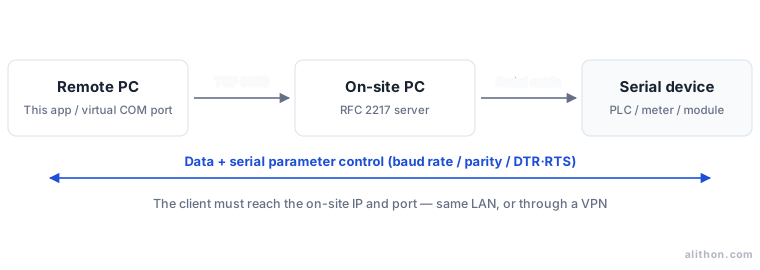
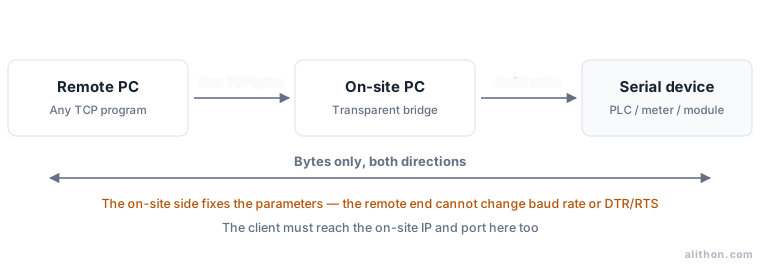
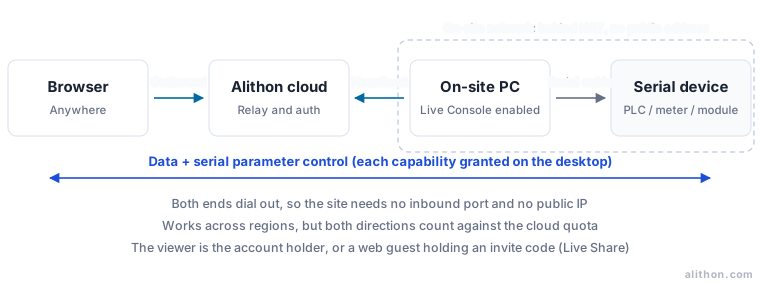
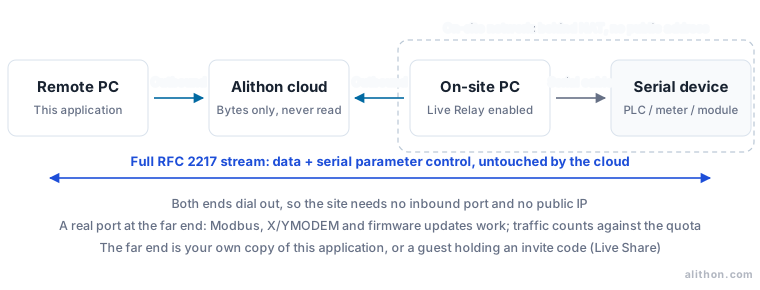
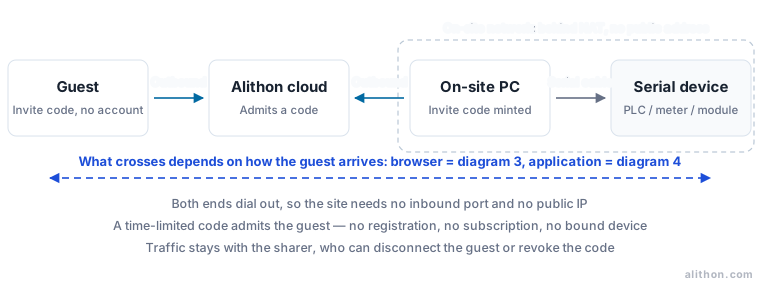
Side by side
| RFC 2217 | Transparent TCP | Live Console | Live Relay | Live Share | |
|---|---|---|---|---|---|
| Network requirement | Client reaches the site IP and port | Client reaches the site IP and port | Site has Internet access; no inbound port | Site has Internet access; no inbound port | As Live Console / Live Relay |
| Change serial parameters remotely | Yes | No | Yes | Yes | In the application yes; in a browser at the level you minted |
| Drive DTR/RTS remotely | Yes | No | Yes | Yes | In the application only |
| Protocol streams (Modbus, file transfer, firmware) | Yes | Yes | No — a frame-limited live window | Yes | In the application yes, in a browser no |
| What the client is | This application, an RFC 2217 virtual COM driver, pyserial, device-management software | Any TCP program | A browser | This application — signed in to the same account | A colleague holding the code — browser or application, no account |
| What the site sets up | Physical port + TCP Server + RFC 2217 server bridge | Physical port + TCP Server + transparent bridge | Sign in and enable remote access | Sign in and allow Live Relay — GUI or the headless spu --share |
Sign in and mint an invite code for one open port — GUI or the headless spu --invite |
| Encryption and authentication | None; relies on the LAN or VPN | None; relies on the LAN or VPN | Yes, through the account and cloud link | Yes, through the account and cloud link | Yes, through the code and cloud link, with an optional passcode |
| Extra cost | None | None | Uses the traffic quota | Uses the traffic quota (larger with Pro) | Uses the sharer's traffic quota; a guest pays nothing |
| Where to configure it | RFC 2217 server / RFC 2217 client | TCP and UDP debugging | Web remote debugging | Remote serial port | Live Share |
How to choose
Answer the first question: can the client reach the site's IP address and port directly?
- No (the site sits behind NAT, has no public address and there is no VPN) — the cloud paths are the only options. Opening an inbound port or forwarding one just for this exposes a debugging machine to the public Internet, which costs far more than it buys. Then ask what the remote end needs to be:
- A browser is enough — watching traffic, sending the occasional command, opening and closing ports — use Live Console.
- A real port in the application — a protocol has to run end to end (Modbus polling, XMODEM/YMODEM, a firmware update), or a tool on the remote machine must own the port — use Live Relay.
- Yes — then ask the second question: does the remote end need to change serial parameters?
- Baud rate, parity, stop bits or control lines have to change — use RFC 2217. Both ends must speak it; one end alone is not enough.
- Only the bytes need to travel, and the parameters are already fixed at the site — use transparent TCP forwarding. The client can be any TCP program and need not support RFC 2217.
The cloud paths carry a third question, and it has nothing to do with the network: does the person at the far end have an account?
- It is another machine of yours — sign both ends in to the same account and use Live Console or Live Relay directly; no code needed.
- It is somebody else, and registering for one favour is too much to ask — mint a Live Share invite code, valid for anywhere from 1 to 24 hours and disposable. How far it goes in a browser is fixed when you mint it; to run a protocol, move a file or flash firmware, have them open the code as a real port in their own copy of the application.
Common mismatches:
- The site bridge is left on Transparent while the client connects as RFC 2217 — TCP comes up, but "The remote port accepted serial parameter control" never appears and no parameter ever reaches the port.
- A plain TCP socket connects to an RFC 2217 server — negotiation bytes mix into the data stream and show up as garbage in the first few bytes.
- An RFC 2217 port is exposed directly to the public Internet — it has no encryption and no authentication, so anyone who can connect can change your serial parameters. Use a VPN, Live Console or Live Relay when the path crosses the Internet.
- A file transfer or Modbus poll is attempted through Live Console — it is a frame-limited live window, not a pipe, and the protocol stalls. That job belongs to Live Relay.
- The invite code and its passcode go out in the same message — which defeats the passcode entirely. Send the code in one message and the passcode in another.
The five are not exclusive. A common arrangement is RFC 2217 on the LAN day to day and a cloud path while travelling — Live Console to look, Live Relay to drive, a Live Share code when a colleague has to join — all sharing the same physical serial connection.
For complete end-to-end setups, see Connect directly to a remote serial port with RFC 2217 and Debug a serial port from anywhere on the Web.