On this page
Auto reply
Auto reply lets a connection play the device. You write rules; when the data a connection receives matches a rule, Serial Port Utility sends that rule's reply by itself. It is for the days the hardware is not on your desk yet, or not in the state you need:
- Simulate a device for the host program you are writing:
AT+VER?gets+VER:1.2.0, a Modbus 03 request gets a register frame. - Test the host's error handling: answer late, answer only every third time, drop replies at random or fall silent altogether, and see whether its timeouts and retries do what they should.
Each connection has its own rules. To open them:
- Tools → Auto Reply… edits the rules of the focused connection;
- right-click the receive view and choose Auto Reply…;
- or click the ↩ Auto reply badge above the receive view, which shows whenever the connection has an enabled rule.
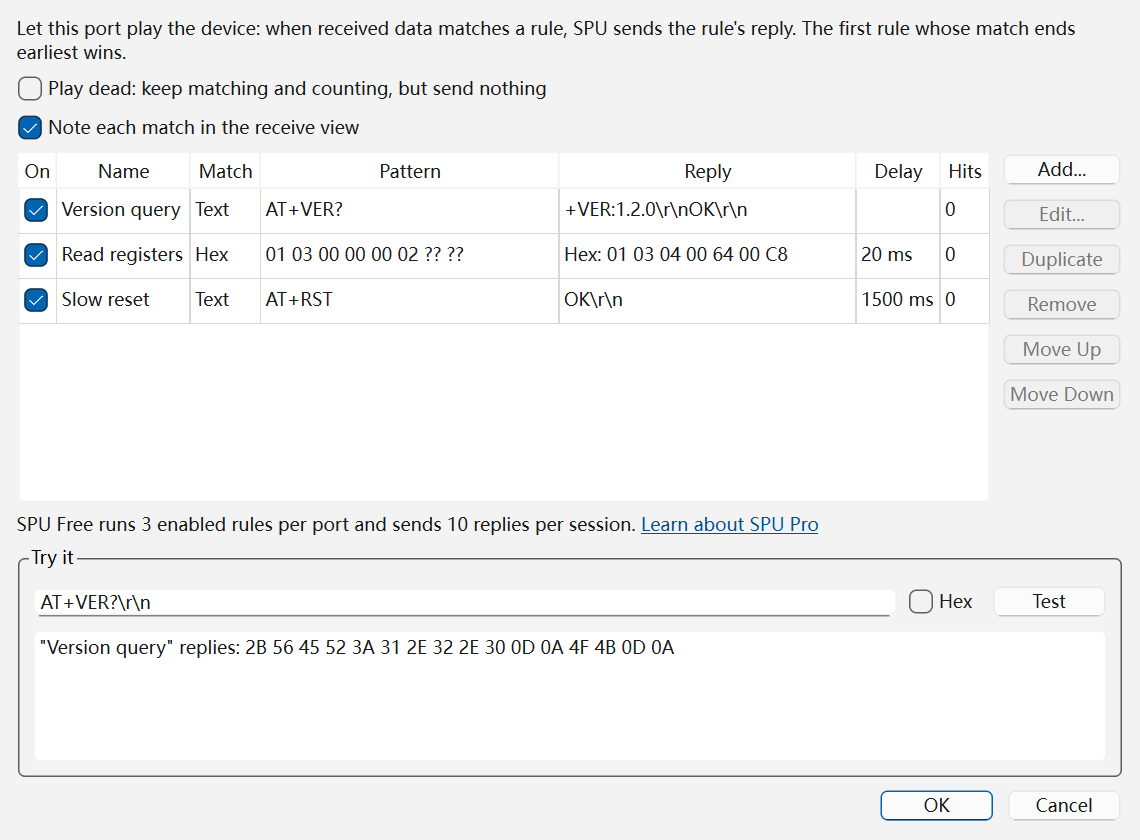
Writing a rule
Click Add… (or double-click a rule to edit it). A rule has three parts.
When this port receives
- Name: optional; it labels the rule in the table and in the receive view's notes.
- Match and Pattern: what to look for, in one of four modes (see How matching works). Under the pattern the editor says whether it is valid and, for text, which bytes it matches.
Reply with
- Format and Reply: text or hex. The reply is sent exactly as written: the send box's line ending is not added, so write
\r\nyourself where the host expects one. Text always reads\r\n\t\xHHand the other escapes the send box knows, whatever its Escape Sequences setting says. Hex takes two digits per byte and refuses a typo rather than sending00. Leave the reply empty to stay silent on a match (the table shows "(silent)"). - Append checksum: None, Checksum-8 (SUM), XOR (BCC), CRC-8, CRC-16/MODBUS or CRC-32, computed over the reply. With CRC-16/MODBUS you type the frame without its CRC and SPU adds the right one.
- Delay: how long to wait before replying, 0 to 600,000 ms. A slow device, or one slower than the host's timeout, is one number away.
Under the reply the editor shows the exact bytes it will send. OK stays greyed out while the pattern or the reply is not valid.
Simulate an unreliable device — see below.
The reply is fixed: it cannot copy parts of the request into the answer. Text is encoded in the connection's encodings — the pattern in the receive encoding, the reply in the send encoding — so a rule keeps working when you change them.
In the table, On switches a rule on or off without deleting it, Hits counts its matches since the rules were last changed, and Move Up / Move Down set the order, which decides ties.
How matching works
The four match modes are the ones the command library's Expect steps use:
| Match | Pattern | Example |
|---|---|---|
| Text | Exact text; \r \n \t and \xHH stand for the bytes they name |
AT+VER? |
| Hex | Bytes in hex; ?? matches any byte |
01 03 00 00 00 02 ?? ?? |
| Wildcard | Text where * matches any run of bytes and ? exactly one; write \x2A for a literal * |
AT+CFG=*\r |
| Regular expression | A Perl-compatible regular expression, run over the received bytes | AT\+[A-Z]+\? |
In Text mode ? and * are just characters, so AT+VER? matches itself; in Wildcard mode the same ? would match any byte. The Hex example matches a Modbus read of two registers from address 0 on slave 1 whatever its CRC. The regular expression matches any AT query such as AT+ID?; it is case-sensitive, so start it with (?i) to ignore case.
What happens between the wire and the rules:
- A command split across reads still matches. Serial data arrives in pieces; SPU keeps the last few kilobytes and matches across them. A fragment left idle for more than a second is forgotten, so half a command cannot complete a match minutes later.
- The match that ends first wins; when two end at the same byte, the rule higher in the table wins. The bytes up to the end of that match are used up and the search goes on, so three commands in one read get three answers, in order, and no byte is answered twice.
- Each peer is matched on its own. On a TCP server, every client has its own buffer, and the reply goes to the client that asked and to no one else; on UDP it goes back to the sender. Serial ports and TCP clients have a single peer.
Simulating an unreliable device
A host program has to cope with a device that is slow, flaky or gone. Each rule's Simulate an unreliable device group, plus one switch for the whole connection, covers that:
- Reply to: 1 in N matches: stay silent N−1 times and answer the Nth. With 3, the host's first two attempts go unanswered and the third gets a reply — a test for its retries.
- Drop replies at random: the chance, in percent, that a match which would have been answered is silently dropped — a flaky link.
- Stop after: after this many matches the rule stops matching and the rules below it take over. Put a
BUSYanswer with Stop after 2 above the real answer, and the device is busy twice before it answers. - An empty reply swallows the match: nothing is sent, and the rules below do not see those bytes. Place it above a broader rule to make one command go unanswered.
- Play dead: keep matching and counting, but send nothing (at the top of the dialog) silences the whole connection at once, without switching the rules off one by one. The badge turns amber and reads "playing dead", so a silent SPU is not taken for a dead device.
A reply delayed past the host's timeout is the simplest test of all: set Delay above it.
Trying a rule before a device is attached
The Try it box under the table runs the rules as they stand in the dialog, before you click OK. Paste what the host would send — AT+VER?\r\n in text, or tick Hex and type bytes — and click Test. Each match is listed with what would happen: which rule replies, after what delay and with which bytes, or why it stays silent (an empty reply, playing dead, not the Nth match).
Nothing is sent, and a test does not use up Free's replies. Each test starts counting afresh, so to see a "1 in 3" rule answer, paste the command three times. The random drop never fires in a test.
While it runs
- The badge above the receive view says the connection answers by itself — "↩ Auto reply · 2 rule(s) · 3/10 replies this session" in Free — so SPU's replies are not mistaken for the device's. Click it to edit the rules.
- Note each match in the receive view (on by default) adds one line per match, such as
Auto reply "Version query": 16 byte(s) sent, or why nothing was sent. While the receive view is paused no notes are added; the badge keeps counting. With Display Send on, the replies themselves show like anything you send. - Replies never interrupt a file transfer. While an XMODEM or YMODEM transfer owns the connection, auto reply sends nothing; replies still waiting out their delay are dropped, and the transfer's own bytes never reach the rules.
- Closing the connection drops waiting replies and any half-received command; the next connection starts clean.
Saving the rules
A saved .spu project keeps each connection's rules and whether it plays dead, and restores them when opened. With no project open, the first connection's rules are kept on this computer and come back at the next launch.
Free and SPU Pro
Writing, editing and testing rules is complete in Free. When the rules run:
- 3 enabled rules per connection. Ticking a fourth is refused and the dialog says why; a rule added beyond three arrives switched off. A project with more enabled rules runs the first 3 from the top, and the badge reads "3 of 5 rules".
- 10 replies per session, across all connections, counted again after a restart. When they are used up the next reply still goes out — a device that goes quiet mid-test looks like a fault in the device — and SPU says the limit is reached. From then on replies are held back until SPU restarts: the badge turns amber and reads "paused (Free limit)", and matches are still counted.
SPU Pro has none of these limits.