On this page
On this page
Text and Hex workflows
Use Text mode when the protocol is readable: AT commands, startup logs, console output or line-based messages.
Use Hex mode when the protocol is binary: Modbus RTU, private UART frames, sensor packets, bootloader frames or data that contains non-printable bytes.
Practical checks:
- If text looks garbled, confirm the baud rate first, then check encoding and display mode.
- If a binary command does not work, compare the exact bytes in Hex mode.
- For complete messages, configure Append Line Ending instead of typing invisible characters manually. For terminal-style typing in the receive view, configure Enter Sends separately. For a control byte inside a text message, turn on escape sequences.
- Keep sample frames with spaces, for example
01 03 00 00 00 02 C4 0B, so they are easier to review.
Text encoding
Text and Hex decide how a message is displayed; the encoding decides which bytes the device actually receives. The two are independent: Chinese devices commonly use GB18030, GBK or Big5, and reading those as UTF-8 produces mojibake — as does the reverse.
Pick the encoding in the Receive Setting and Send Setting groups of the Quick Settings panel, right of the Text/Hex buttons. The Receive and Send pages of the settings dialog carry the same control.
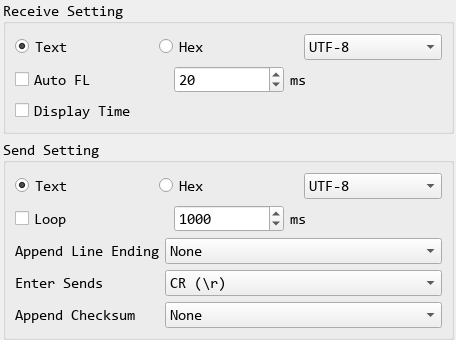
Available: UTF-8, GB18030, GBK, GB2312, Big5, Shift-JIS, EUC-KR, ISO-8859-1, Windows-1252, System.
What to know:
- Receive and send are independent. A device that answers in GBK while you prefer to send UTF-8 is a valid configuration.
- Changes take effect immediately, with no need to reconnect while data is arriving. A half-assembled character is dropped at the switch, which is what changing an encoding should do.
- Hex mode greys the selector out, because hex is raw bytes — but your choice is kept, so switching back to Text restores it.
- A character the encoding cannot represent is refused, not substituted. A device cannot tell a substituted
?from one you typed, so nothing is sent: the status bar names the character and the text stays in the box for you to fix. Thai in GBK is one example. - Log files are always written as UTF-8, independent of the wire encoding, so they stay readable on any machine.
- Checksums cover the bytes actually sent. The same text produces different bytes under UTF-8 and GBK, so the checksum differs too.
To diagnose mojibake, check in this order: baud rate, then Text/Hex mode, then encoding. If ASCII is fine and only Chinese, Japanese or Korean characters are wrong, the encoding is almost certainly the cause.
Escape sequences
To put a control byte into a text message without switching to Hex, tick Escape Sequences (\n \r \xHH) on the Send page of the settings dialog (Tools → Settings…). It is off by default and applies to Text mode only. With it on, the send box reads:
| Write | Sends |
|---|---|
\r \n \t |
CR, LF, tab (0D 0A 09) |
\0 \a \b \f \v \e |
NUL, BEL, BS, FF, VT, ESC (00 07 08 0C 0B 1B) |
\xHH |
Any byte, for example \x1B |
\\ |
One backslash |
- An escape names a byte, so it bypasses the text encoding; the text around it is encoded as usual.
- Append Line Ending still applies, and a typed
\nstays the single byte0A: it is not rewritten to the line ending's CR LF. A checksum covers the bytes that actually go out. - An unknown escape refuses the frame.
\q, a\xwithout two hex digits or a lone backslash at the end sends nothing; the status bar says why and the text stays in the box. A guessed byte is never sent. - Hex mode is unaffected. With the option off, a backslash goes out as itself, as in earlier versions.
The option is set per connection and saved with the .spu project. Commands in the command library and auto reply rules always read these escapes, whatever this setting says.