On this page
Live Share (invite codes)
Live Share hands one open serial port to a colleague who has no account: the site machine mints a time-limited invite code for it, and the holder either opens it as a real serial port in their own copy of the application or works with it straight in a browser. They need no registration, no subscription and no bound device; the traffic stays on your side, because handing over the port and paying for it are both yours.
It is not a fifth transport but the guest form of Live Console and Live Relay: a guest arriving in a browser is on the Live Console path, a guest arriving in the application is on the Live Relay path. The network posture, the encryption and the metering are the same as those two — only the person in the far-end box changes, and what admits them is a code rather than an account. On the desktop it sits with RFC 2217 Server, Live Console and Live Relay under the status bar's Live Sync entry. For how the remote paths compare, see Choosing a remote access path.
Mint an invite code (site side)
- Sign in and check Cloud → Live Console — an invite rides the same cloud channel.
- Open the serial port you want to share and choose Cloud → Share Port with a Guest…, or the status bar's Live Sync → Live Share….
- Pick how long it stays valid (1 / 4 / 12 / 24 hours, 12 by default), add a passcode if you want one, and write a label your colleague will recognise. Then decide how far the code goes in a browser — not allowed / view only / view and send / view, send and port control (view only by default) — and whether it also opens as a real serial port in Serial Port Utility (allowed by default). Press "Create Invite".
- Send them
XXXX-XXXX-XXXXor the link. Send the passcode separately — in the same message it defeats the point.
This is independent of Live Relay, in both directions: that switch admits your own other machines, an invite admits the holder of the code, to that one port, for that long. A share ends when the port closes, when Live Console is switched off, on sign-out and on exit.
Joining in the application (their side)
- In a connection's settings, choose Remote Serial (Live Relay) as the port type.
- In the "Select a Remote Serial Port" dialog, paste the code or the whole link under Join with an invite code, type the name the host should see, and add the passcode if one is required.
- Start the connection. The dialog first shows which machine and port the code names, whether the host is online, and whether someone is already on it.
What they get from there is exactly the port you would have got: Text/HEX send and receive, timestamps, logging, control lines, CRC tools and file transfer. The behaviour, the rate limits and the failure modes are an ordinary Live Relay session's — see Remote serial port with Live Relay.
Joining in a browser (nothing to install)
The same code opens in a browser: your colleague follows the link, types a name you will recognise (and the passcode, if there is one), presses "Open in the browser", and sees the port's live output — no installation, no account. The level you chose when minting decides what else they can do:
- View only: watch the port's output live.
- View and send: plus a send box (text or HEX, with a choice of line ending).
- View, send and port control: plus open / close port and baud rate, data bits, parity and stop bits.
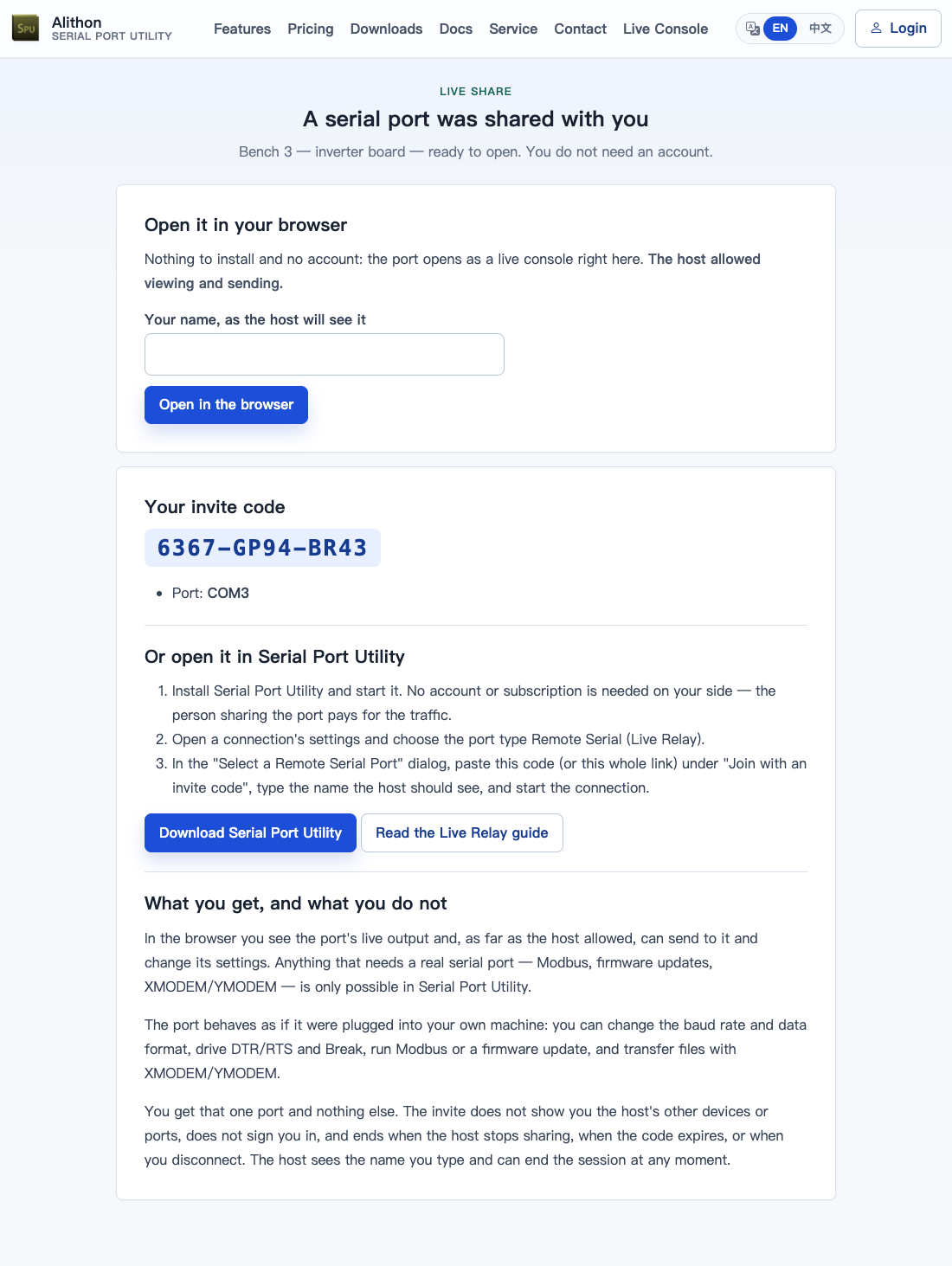
A browser guest sees that one port and nothing else — not the device's other ports, not your account, not your machine. Every command they send appears in your device page's command history under their name; the share dialog and "Manage Guest Shares…" list who is watching from a browser. You can stop sharing at any time, and every browser session ends within seconds.
The two paths complement each other rather than compete: a browser has no real serial port, so Modbus, XMODEM/YMODEM, firmware updates and DTR/RTS/Break remain things for Serial Port Utility; and what a browser shows is decoded text that, like Live Console, passes through a short cloud buffer — whereas a real-port relay only forwards bytes the cloud never reads. While a Live Relay holds the port, the browser can watch but not send.
Headless machines (spu --invite)
A site machine does not need a desktop session; spu --invite does the same thing:
spu -D /dev/ttyUSB0 -b 115200 --invite --invite-label "bench 3"
spu: invite code ABCD-EFGH-JKLM   link https://alithon.com/r/ABCD-EFGH-JKLM   expires 2026-08-21 18:00
--invite-ttl takes 30m / 4h / 1d (default 12h), --invite-passcode-stdin reads a passcode from a pipe rather than the command line, and Ctrl-C revokes the invite on the way out. --invite-web view|send|control|none (default view) sets how far the code goes in a browser, and --invite-no-relay makes it browser-only. It combines freely with --share; the two are separate consents.
What the host keeps
- The status bar says so: the Live Sync cell turns orange and reads In use, naming the guest outright when there is only one — "Guest: Ann" — with the notice line "Guest Ann is using this port". A port driven from elsewhere has to be visible, and so does by whom.
- The share dialog offers "Disconnect Guest" and "Stop Sharing" at any moment; stopping ends the live session and invalidates the code together.
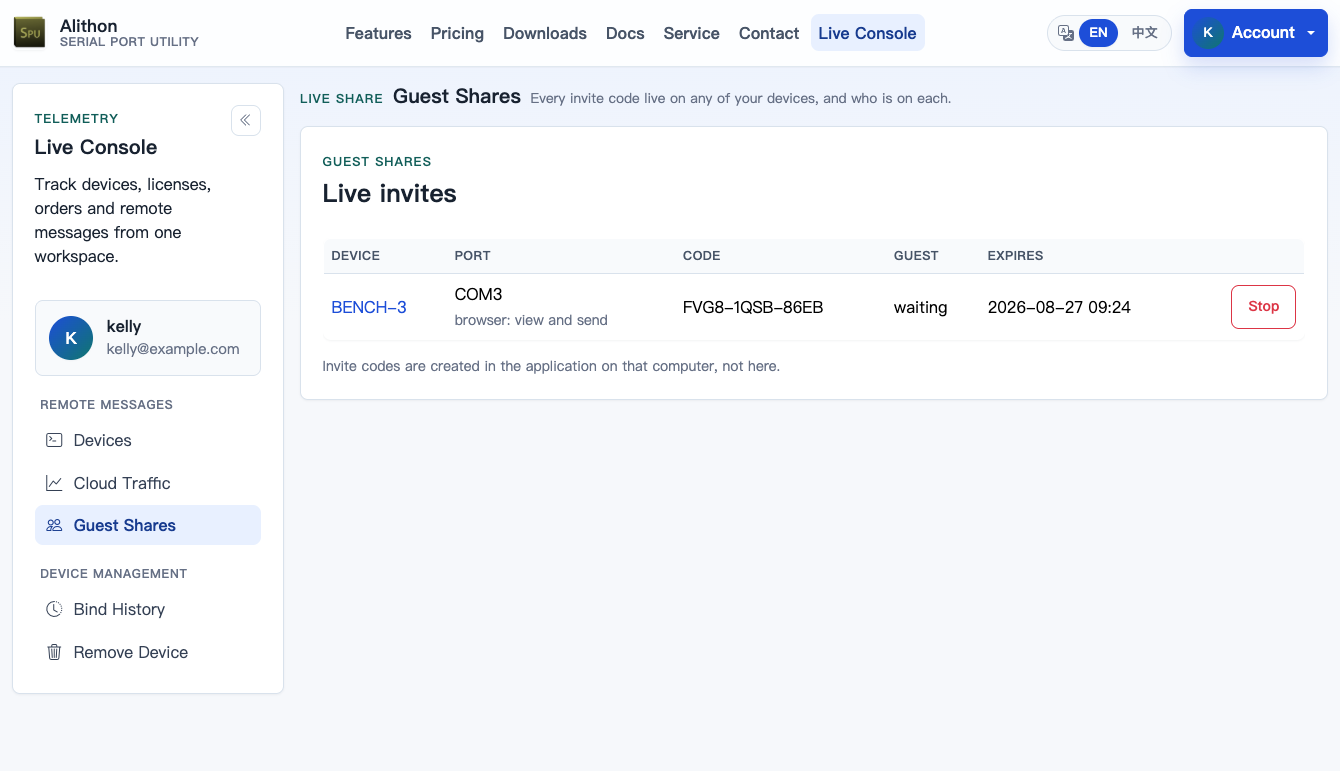
- The device page under Live Console → Devices lists this machine's live shares, and Live Console → Guest Shares lists every live share on every machine you own; either can revoke one remotely — but never create one: minting a share is granting a takeover, and that consent belongs on the machine that owns the port.
- In the desktop app, Cloud → Manage Guest Shares… shows the same account-wide list, including invites minted on your other machines, and can end any of them.
- Five wrong passcodes burn the code. An expired code admits no new guest but does not cut a session already in progress — interrupting a firmware update halfway is the worst outcome available.
- Unknown, expired and revoked codes all get the same answer, so nobody can probe for codes that once existed.
Traffic, subscription and privacy
- A guest pays nothing: the session's traffic counts against the sharing side's monthly allowance (10 MB per direction on a free account, 1 GiB with Pro), and they need no account, subscription or licence; sharing itself does not require Pro.
- A guest's bytes are metered against your monthly cloud traffic allowance and top-up balance, the same pool as Live Console and Live Relay; there is no separate guest quota. Budget with this number: a port running flat out at 115200 8N1 in both directions moves about 22.5 KB/s — roughly 81 MB per hour.
- A browser guest sees that one port's decoded text, passed through a short cloud buffer with the same size and retention as Live Console; a guest who joins as a real serial port is on the Live Relay byte pipe, which the cloud forwards without reading.
- How far a guest can go is fixed when you mint the code, checked once by the server and once by your device, and cannot be raised from the web. These data flows are disclosed in the Privacy Policy.